From Guest Request to Table: A Practical Guide to Restaurant Booking Software
Introduction
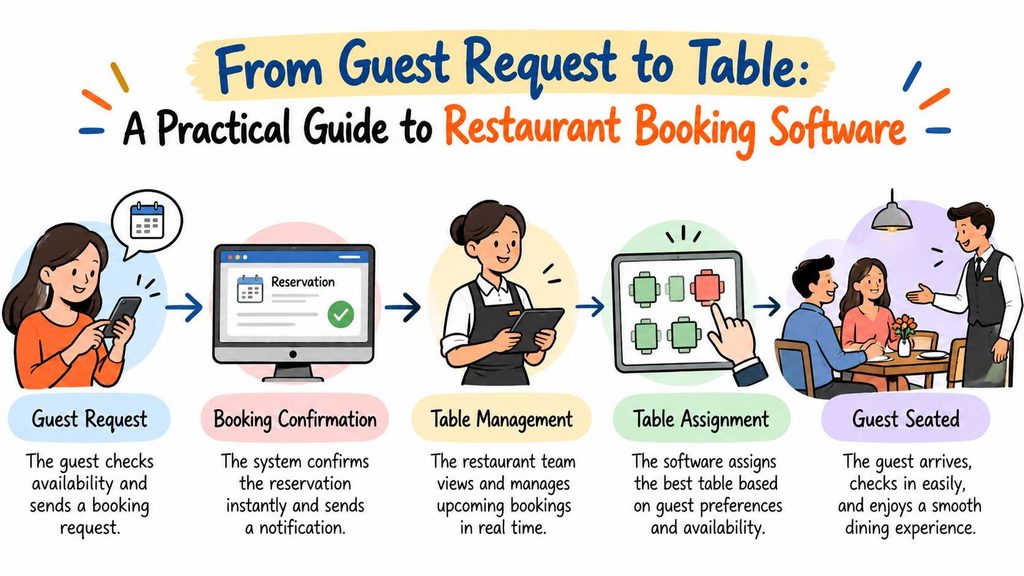
A great dining experience starts before guests enter a restaurant. Many customers first contact the restaurant online or by phone. They want to find a suitable time, reserve a table, and enjoy a smooth visit.Restaurant teams must manage these requests while handling daily service. Staff members also need to track available tables, welcome walk-in guests, and answer customer questions. These tasks can become difficult when teams rely on paper notes or scattered records.Restaurant reservation software gives teams a more organized way to manage bookings. It can bring reservations, table planning, and waitlists into one workflow. The right system helps staff access booking details and plan service more clearly.However, every restaurant has different needs. A small café may need a simple online booking system. A busy dining room may need stronger table management and waitlist tools.This guide explains how restaurant booking software works, which features matter, and how to choose a suitable system.
Start by Understanding Your Booking Process
Before comparing software, review how your restaurant handles reservations today. This step helps you identify problems that technology should solve.
Begin with the way customers make bookings. Some guests may call during business hours. Others may prefer an online booking page that works outside opening hours.
Next, examine how your team records each reservation. Staff should know the guest’s name, booking time, party size, and table status. Missing details can create confusion during busy periods.
You should also review how your restaurant handles changes. Guests may arrive late, cancel a booking, or ask to change their party size. Your team needs a clear process for updating these details.
Consider these questions:
- Can guests book a table without calling the restaurant?
- Can staff quickly check available tables?
- Does the team have one clear view of upcoming bookings?
- How does the restaurant manage waiting guests?
- Can staff update reservations without creating confusion?
- Does the current process create extra work during peak hours?
Write down the main problems before choosing a system. This list will help you focus on useful features instead of unnecessary extras.
How Restaurant Reservation Software Supports Daily Operations
Restaurant reservation software helps teams organize guest bookings. Depending on the product, it may also support table planning, waitlists, and walk-in management.
The goal is simple: help staff find booking information and coordinate service more easily.
Online Booking for Guest Convenience
An online restaurant booking system lets customers request tables through a digital booking page. Guests can check available options and submit their reservation details.
This approach gives customers another way to contact the restaurant. It can also help staff manage booking requests during busy service periods.
Before choosing a system, check how the booking page works on mobile devices. Many customers use their phones to find restaurants and plan meals.
You should also review the booking steps. A clear process should explain available times and request the information the restaurant needs.
Centralized Reservation Records
A central reservation record helps staff review upcoming bookings. Instead of checking several notebooks or messages, the team can use one place to find reservation details.
This can reduce confusion when staff members share booking duties. It also helps the restaurant maintain a clearer view of expected guests.
Ask whether the software supports reservation updates and cancellation handling. Confirm how changes appear to staff and how the system records booking status.
Restaurant Table Management Software
Table management software helps staff organize seating arrangements. It can show which tables are available, reserved, occupied, or awaiting guests, depending on the system.
This information helps staff make better seating decisions. It also gives the host a clearer picture of the dining room.
However, software cannot replace good service planning. Staff must still consider table size, guest needs, and the time required to prepare each table.
Restaurant Waitlist Management Software
A waitlist tool helps staff organize guests who need a table. The team can record waiting parties and review their position in the queue.
This creates a more consistent process for managing busy periods. It can also help staff avoid relying on memory alone.
Before selecting a waitlist feature, check what it offers. Some systems may support guest notifications, while others may provide only basic waitlist records.
Walk-In Guest Management
Not every customer makes a reservation. Some guests arrive without booking and ask for an available table.
Restaurant walk-in management software can help staff record these visits alongside scheduled reservations. This gives the team a more complete view of expected and current demand.
The restaurant should choose a process that works for both booking types. Staff need to understand how walk-ins affect upcoming reservations and table availability.
Choose Features That Match Your Restaurant
A long feature list does not always mean a better product. The best choice depends on your restaurant’s size, service style, and daily workload.
Use the following table to compare common software features.
| Feature | What It Helps With | What to Check |
|---|---|---|
| Online booking page | Accepting digital reservation requests | Mobile access and booking steps |
| Direct booking tools | Receiving reservations through restaurant-controlled channels | Available booking options |
| Reservation calendar | Reviewing upcoming bookings | Search, editing, and status updates |
| Table management | Organizing seating and table availability | Table status and seating controls |
| Floor plan tools | Viewing the restaurant layout | Layout editing and table assignment |
| Waitlist management | Organizing guests who need a table | Queue updates and guest communication |
| Walk-in management | Recording guests without reservations | How walk-ins interact with bookings |
| Booking confirmations | Helping guests review their reservations | Confirmation methods and message controls |
| Staff access controls | Managing staff permissions | Roles and access settings |
| Operational reports | Reviewing available booking information | Report types and export options |
Use this table as a starting point. Product features can differ, even when two systems use similar names.
Ask each provider to demonstrate the features you plan to use. A short demonstration can reveal whether the system fits your real workflow.
Plan Seating Before the Dining Room Gets Busy
Table planning affects both guest comfort and restaurant operations. A suitable reservation system should help staff understand the seating plan.
For example, imagine a restaurant with small tables for two guests and larger tables for families. The host needs to match each booking with a suitable table.
A party of two may fit at a small table. A larger group may need a bigger table or several tables together. The staff must also consider existing reservations and the time guests expect to arrive.
Restaurant floor plan software can make this process easier by showing the dining room layout. Some systems may also support table assignments and status updates.
Before choosing this feature, check whether you can adjust the floor plan. Restaurants may change table arrangements for special events or different service needs.
Also, confirm whether staff can update table status quickly. A useful layout should support decisions during service, not create more work.
Remember that table availability involves more than empty seats. Staff must allow enough time for dining, cleaning, and preparing the table for the next guests.
Make the Waiting Experience Easier to Manage
Long waits can frustrate guests when staff cannot explain what happens next. A clear waitlist process helps the team organize arrivals and communicate more consistently.
Start by recording each waiting party. Staff should capture the details needed to manage the queue, such as party size and arrival time.
Next, decide how the restaurant will estimate waiting times. Estimates should reflect current demand and table turnover. Staff should avoid promising a time they cannot reasonably meet.
A digital waitlist may help the host review waiting parties more easily. Some products also offer guest messaging, but you should confirm this feature before purchasing.
Your team should also explain the process to customers. Let guests know how the restaurant will contact them and what happens if they leave the waiting area.
Good communication remains important even with software. A digital system can organize information, but staff still need to treat guests with care.
Handle Reservations and Walk-Ins Together
Restaurants often serve both booked guests and customers who arrive without reservations. The team needs a fair process for handling both groups.
Consider a restaurant that has several reservations arriving within the next hour. A walk-in party asks for a table. Although one table looks empty, the host must check whether an upcoming booking needs it.
A reservation and table management system can help staff review the schedule. The team can then make a more informed decision about seating the walk-in party.
The restaurant should create clear rules for these situations. Staff need to understand when they can seat a walk-in and when they should protect a table for an upcoming reservation.
The system should support those rules rather than create a new set of problems. During a product demonstration, ask the provider to show how staff handle walk-ins, table changes, and upcoming bookings.
What Small Restaurants Should Look For
Small restaurants often work with limited staff and tight budgets. They may not need every feature that a large hospitality group uses.
A restaurant reservation software solution for small restaurants should focus on the tasks that matter most. These may include online bookings, reservation records, table availability, and basic waitlist handling.
Ease of use should also guide your decision. Staff should understand the main booking process without spending too much time learning the system.
Consider the number of people who need access. A restaurant may need separate permissions for managers, hosts, and other staff members. Check whether the product supports the roles you require.
Cost is another important factor. Review the subscription price, setup charges, usage limits, and any optional services. Ask the provider to explain the full cost before you agree to a plan.
Finally, avoid buying features that your team will not use. Start with the main operational needs and expand only when a clear need appears.
Is a Free Restaurant Reservation System a Good Starting Point?
A free restaurant reservation system can help a business explore digital booking tools without committing to a paid plan immediately.
However, the word “free” does not explain the full offer. Some products provide a limited free plan. Others may offer a trial, a pilot program, or free access under specific conditions.
Check what the plan includes before relying on it.
Review these points:
- Booking limits: Find out whether the plan limits reservations or users.
- Core features: Confirm access to table management and waitlist tools.
- Guest communication: Check whether booking confirmations or reminders cost extra.
- Staff access: Find out how many team members can use the system.
- Reports: Review which operational reports the plan provides.
- Support: Ask what help the provider offers during setup and daily use.
- Future costs: Check what happens when your needs grow.
A free plan may suit a restaurant with simple booking needs. A busier operation may need additional controls or support.
Compare the total value, not only the starting price. A low-cost tool may still create extra work if it lacks features your team needs.
How to Evaluate a Restaurant Booking System
Choosing software becomes easier when you follow a consistent review process. Instead of relying on marketing claims, test each option against real restaurant tasks.
Step 1: Set Your Main Goals
List the problems you want to solve. You may want to reduce manual booking work, improve table visibility, or organize waiting guests.
Keep the list short and practical. These goals will guide your product comparison.
Step 2: Identify Essential Features
Separate must-have features from optional ones. For example, online booking may be essential for one restaurant, while advanced reporting may matter more to another.
This step helps you avoid paying for features that offer little value to your team.
Step 3: Test Real Booking Scenarios
Ask the provider to show common tasks during a demonstration.
Include a new reservation, a cancellation, a party-size change, a walk-in arrival, and a table reassignment. Watch how many steps each task requires.
Step 4: Review Staff Access
Confirm who can create, edit, or cancel reservations. Check whether managers can control access for different staff roles.
Clear permissions help teams manage booking information consistently.
Step 5: Check the Full Cost
Review monthly or annual fees, setup costs, add-ons, and plan limits. Ask the provider to explain any charges that may apply later.
Do not assume that every advertised feature comes with the base plan.
Step 6: Plan the Changeover
Decide how your team will move from the current process to the new system. You may need to enter future reservations, create staff accounts, and explain new procedures.
A simple rollout plan helps staff learn the system before a busy service.
Where DineGlobe Fits Into the Decision
DineGlobe is a restaurant reservation software platform designed to support booking and front-of-house workflows. Its stated focus includes online reservations and tools for organizing restaurant operations.
The platform’s described capabilities include booking pages, table management, floor plans, waitlist handling, and walk-in management. It also describes reservation confirmations, staff access controls, and operational reporting.
These features may be relevant to restaurants that want to organize several booking tasks in one workflow. However, each restaurant should confirm which functions match its needs.
Before choosing DineGlobe or another platform, request a demonstration. Ask the provider to show how the system handles your restaurant’s normal booking process.
Confirm current pricing, plan limits, setup requirements, support, and available features directly. If the provider offers a pilot or free access, check the current terms before making a decision.
The right choice should fit your daily work. It should help your team manage reservations clearly without adding unnecessary steps.
Common Mistakes to Avoid When Choosing Software
Restaurants can waste time and money when they select a system without testing it. A few simple checks can help prevent common problems.
Choosing by price alone: A low price may look attractive, but the plan may lack essential tools. Compare the full cost with the work the system can support.
Ignoring staff needs: A complicated interface can slow down service. Include the people who manage bookings when testing the product.
Overlooking walk-ins: A restaurant may focus on online reservations and forget about guests who arrive without booking. Test how the system handles both groups.
Assuming all features come standard: Similar product names do not guarantee the same functions. Ask for a clear feature list and plan details.
Skipping staff training: Even useful software needs a clear setup process. Give staff time to practise before relying on it during peak service.
Failing to review the process: Software cannot fix unclear rules by itself. Define how staff should handle cancellations, late arrivals, and table changes.
A careful review helps the restaurant select a system that supports its actual workflow.
Frequently Asked Questions
1. What Is Restaurant Reservation Software?
Restaurant reservation software helps restaurants record and manage table bookings. Depending on the product, it may also support table planning, waitlists, walk-ins, and booking confirmations.
2. How Does an Online Restaurant Booking System Work?
An online booking system lets guests submit reservation requests through a digital page. The restaurant can then review and manage those bookings through the available tools.
The exact process depends on the provider and its settings.
3. Can Small Restaurants Use Reservation Software?
Yes. Small restaurants can choose a system that matches their booking volume and staffing needs.
A simple product may provide enough support for online bookings and basic table management.
4. What Is the Difference Between Reservation Software and Table Management Software?
Reservation software focuses on recording and managing bookings. Table management software focuses on seating arrangements and table status.
Some restaurant platforms combine both functions.
5. What Does Restaurant Waitlist Management Software Do?
Waitlist management software helps staff organize guests who are waiting for tables. Depending on the product, it may also support status updates or guest notifications.
Restaurants should check which waitlist features each plan includes.
6. Can a Restaurant Manage Walk-In Guests With Booking Software?
Some systems include walk-in management tools. These tools can help staff record walk-in parties and review them alongside scheduled reservations.
Check whether the product supports the process your restaurant uses.
7. Why Does Restaurant Floor Plan Software Matter?
Floor plan software helps staff view the restaurant’s table layout. It may support table assignments and seating decisions.
The available controls vary by product, so test the layout before choosing a system.
8. Is a Free Restaurant Reservation System Enough?
A free system may suit restaurants with basic booking needs. However, some free plans limit features, users, or reservation volume.
Review the plan details before relying on it for daily operations.
9. What Should Restaurants Check Before Buying Reservation Software?
Restaurants should review ease of use, booking tools, table management, staff permissions, support, and total cost. They should also test common tasks before making a decision.
A practical demonstration can help reveal whether the system fits the restaurant.
10. How Can a Restaurant Introduce a New Booking System?
Start by choosing the essential features and setting up staff access. Enter upcoming reservations, train the team, and test common booking tasks.
Introduce the system before a busy service whenever possible. Review the process after staff begin using it and adjust where needed.
Final Thoughts
A reliable booking process helps restaurants manage guest requests with greater clarity. It gives staff a better way to review reservations, plan seating, and organize waiting guests.Restaurant reservation software can support these tasks, but the right choice depends on daily needs. Some restaurants need only online booking and simple records. Others need floor plans, walk-in handling, and more detailed operational controls.Start by identifying your main problems. Compare features, test common scenarios, and review the full cost before making a decision.DineGlobe is one option to evaluate if its stated booking and front-of-house tools match your requirements. Confirm its current features and terms directly before committing.Most importantly, choose a system your staff can use with confidence. A clear workflow and well-trained team remain essential to a smooth guest experience.
Leave a Reply